Multilogin Profile Isolation and Fingerprint Stability: Defaults, Canvas Noise, and Restarts
Separate website data and different fingerprint values are two things to check. With the network held fixed, we compared two profiles, changed Canvas alone, and repeated the readings after restarts.

On this page
- Test setup: one network, two profiles
- Configuration: what changes and what stays real?
- Profile isolation: does data cross between profiles?
- Default fingerprints: different identities, matching Canvas and audio
- Stability: what repeated after a restart?
- Where the configuration experience needs work
- Ratings and product assessment
- More from the Multilogin review series
- Frequently asked questions
Multilogin kept the two test profiles’ website data separate and preserved the sampled fingerprints across refreshes and normal restarts on the same computer. Default Canvas and audio values matched between the profiles because those settings used Real mode. Changing only B’s Canvas to Noise produced a new value that remained stable.
These are three distinct qualities: separate website data, differences between profiles, and repeatability within one profile. Evaluating them separately makes the results useful for configuring a browser profile and for comparing product behavior.
Test setup: one network, two profiles
The T03 session took place on October 31, 2026 using a paid Pro 20 plan, one Mac, and Mimic 155.5. We created two cloud profiles, EnvTrace-T03-A and EnvTrace-T03-B, both configured to restore their previous tabs.
Both profiles used the computer’s existing Clash connection and showed the same Hong Kong exit. The Chinese UI option was “无全局IP”: we selected no separate profile proxy. The computer itself still used its existing network tunnel. Holding that path constant kept the comparison focused on profile settings.
We used a local storage test page and SauceDemo’s public demonstration site for isolation checks. EnvTrace and BrowserLeaks supplied fingerprint readings, with WhoerIP used for an initial observation. A retained the default configuration. B started with the same default options and later changed only Canvas to Noise.
The figures below retain the original Chinese-language interface and test page. English captions identify the relevant setting or result. The test record includes 27 screenshots and the complete sampled values.
Configuration: what changes and what stays real?
Official guidance: Multilogin recommends keeping the defaults unless a change serves a clear purpose, and adjusting one setting at a time. Official fingerprint settings guide.
Our interface observations: the profile creation screen applies several different treatments to browser signals. These were the settings we observed before establishing the baseline:
| Setting | Observed configuration | What it controls |
|---|---|---|
| Name, folder, tags, notes | User-defined | Identification and organization |
| Storage and startup behavior | Cloud; restore previous tabs | Data saving and the next launch |
| WebRTC, timezone, language, geolocation data | Masked | Network and regional information exposed to websites |
| Geolocation permission | Prompt | Whether a website request needs permission |
| Screen, fonts, Navigator, GPU metadata | Masked | Reported device identity |
| WebGL graphics | Noise | Graphics drawing output |
| Canvas, audio, media devices | Real | Output from the real device |
| Port scan protection | Masked | Website access to local port probes, with configurable exceptions |
The custom controls also exposed the user agent, platform, CPU core count, OSCPU, WebGL GPU information, and WebGPU device identifiers. We inspected the options and restored defaults before testing. Extensions and preloaded cookies had configuration entries, with some options marked as plan-limited.
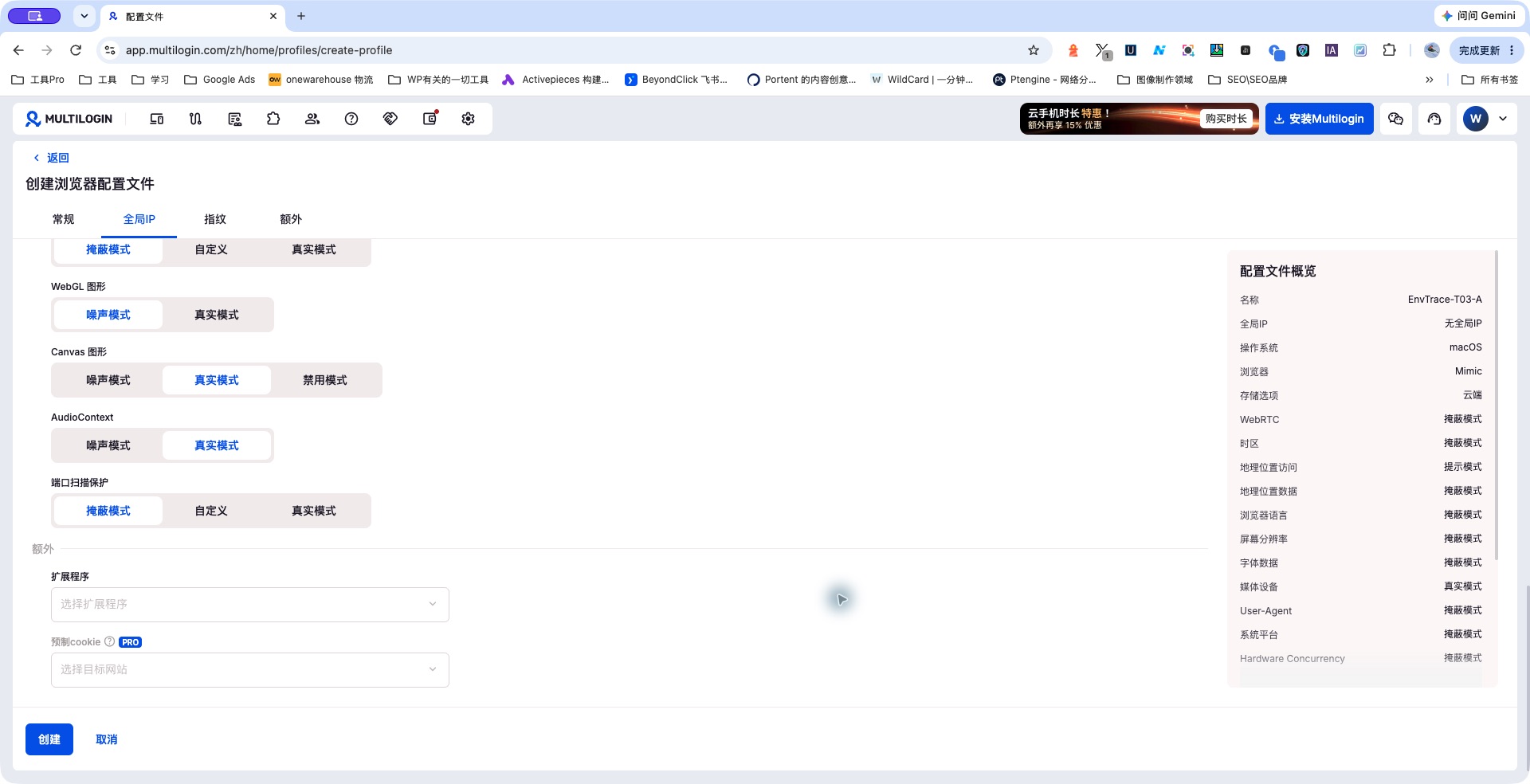
Our product interpretation: separating the reported GPU name from graphics drawing behavior is a useful design choice. One describes an identity; the other comes from computation. The interface should explain that relationship so users understand what changing either setting actually affects.
Profile isolation: does data cross between profiles?
We checked six kinds of state at the same local address: cookies, localStorage, sessionStorage, IndexedDB, CacheStorage, and window.name. The first five cover common storage mechanisms; the last records temporary window state.
- A’s first visit returned empty values in all six checks. After writing A-1031 and refreshing, all six showed A’s marker.
- B’s first visit to that same address also returned six empty values. We wrote B-1031 and refreshed; all six then showed B’s marker.
- After a full stop, restart, and refresh of B, the first five values remained B’s.
window.namecleared. - Reopening A recovered its own five saved values, with
window.namecleared. B’s data had not replaced A’s data.
The profiles were open together during part of the session, and we read their state in A/B order. sessionStorage survived with the tabs restored in this workflow. We recorded the cleared window.name as the observed lifecycle of temporary window state after a full restart.
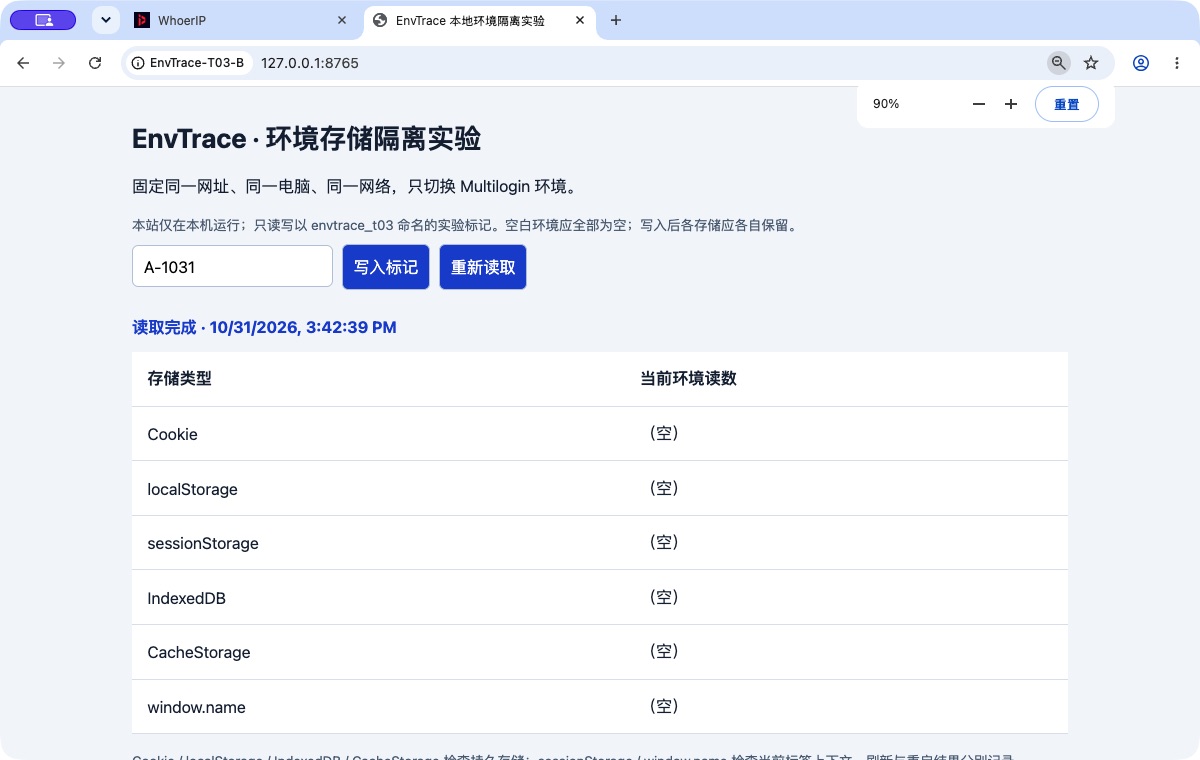
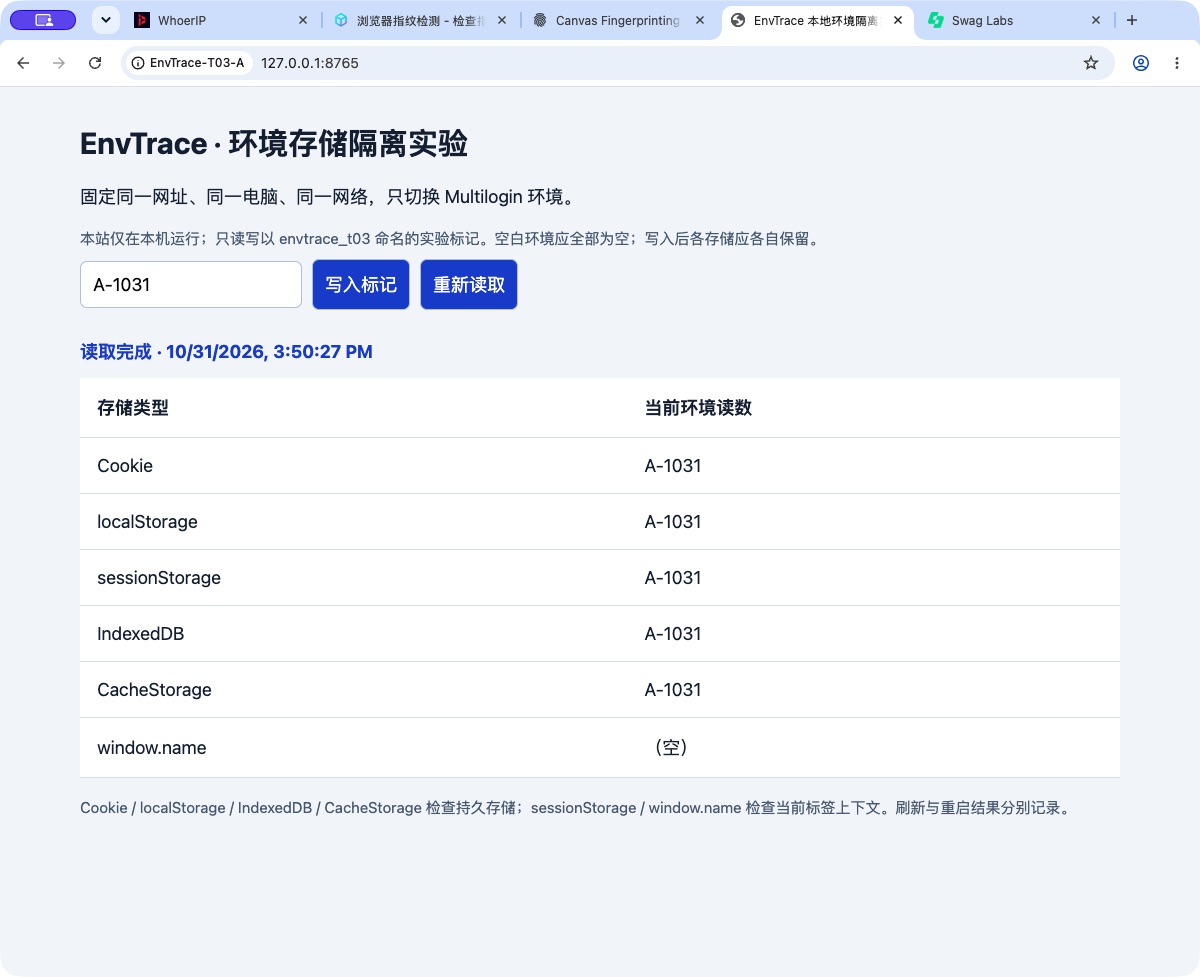
We cross-checked with a website workflow. A signed in to SauceDemo and added a Backpack to its cart. B opened the protected product page and was sent to the login page. After B independently signed in to the same demo account, its cart was empty. We added a Bike Light in B, then checked A: A’s Backpack remained.
Result: website storage and login state were separated by profile, and saved state returned independently. Profile data isolation earns A.
Default fingerprints: different identities, matching Canvas and audio
| Observed field | Profile A | Profile B with defaults |
|---|---|---|
| Reported browser version | Chrome 155 | Chrome 155 |
| Client Hints operating system version | macOS 26.1 | macOS 13.6.6 |
| Screen | 1728 × 1117 | 1440 × 900 |
| CPU cores | 10 | 8 |
| Reported memory | 16 GB | 16 GB |
| GPU name | Apple M1 Pro | Apple M1 |
| Language and timezone | en-US, en; Hong Kong | en-US, en; Hong Kong |
| Canvas output | Matched B in the corresponding test | Matched A |
| Audio output | Matched B in the corresponding test | Matched A |
| BrowserLeaks WebGL | Report and drawing hashes differed between A and B | Different from A |
The matching Canvas and audio outputs align with the Real modes shown in the settings. For a workflow that needs different Canvas output across profiles, this is a setting to review explicitly before creating the final configuration.
The reported operating system also has to be read by interface. The traditional user agent contained macOS 10_15_7, while Client Hints reported newer versions. Chromium’s user-agent reduction policy freezes parts of the traditional string. Chromium user-agent reduction documentation.
Our interpretation is that Multilogin’s defaults are selective. The useful configuration question is which signals you intend to preserve or change, followed by whether the resulting profile stays internally consistent and repeatable.
Stability: what repeated after a restart?
A’s sequence included its initial launch and four complete stop-and-reopen cycles. B moved through a default launch, a default restart, the first launch with Canvas Noise, and a restart with Noise retained. We sampled different readings at the checkpoints listed below.
| Check | Comparison points | Observed result |
|---|---|---|
| A: device identity, Canvas, audio | Initial launch, restart 1, restart 3 | Matching sampled values |
| A: BrowserLeaks Canvas | Initial launch, refresh after restart 1, restart 2 | Same value |
| A: BrowserLeaks WebGL | First reading and refresh after restart 4 | Same report and drawing hashes |
| B: default settings | Initial launch and default restart; additional WebGL refresh | Matching sampled identity, Canvas, audio, and WebGL values |
| B: Canvas Noise | After the change, refresh, and full restart | Same new Canvas value |
EnvTrace showed 100/100 consistency in these configurations. Our rating rests on the repeated individual readings, cross-checked with BrowserLeaks graphics results. Fingerprint stability on the same computer earns A.
Changing only Canvas produced a persistent new value
We stopped B and changed Canvas from Real to Noise. Audio remained Real, WebGL remained Noise, and the other identity parameters were retained.
| Test | Default Real mode | After enabling Noise | After a full restart |
|---|---|---|---|
| BrowserLeaks Canvas | E97C…562C2F | D028…712080 | Same new value |
| EnvTrace Canvas | de7811…31e13c | 4edb00…d1512b | Same new value |
| Audio, WebGL, sampled identity values | Original values | Original values | Original values |
The displayed hashes are shortened for readability. Each page uses its own drawing sample and method, so compare before and after on the same page. The complete readings are retained in the test record.
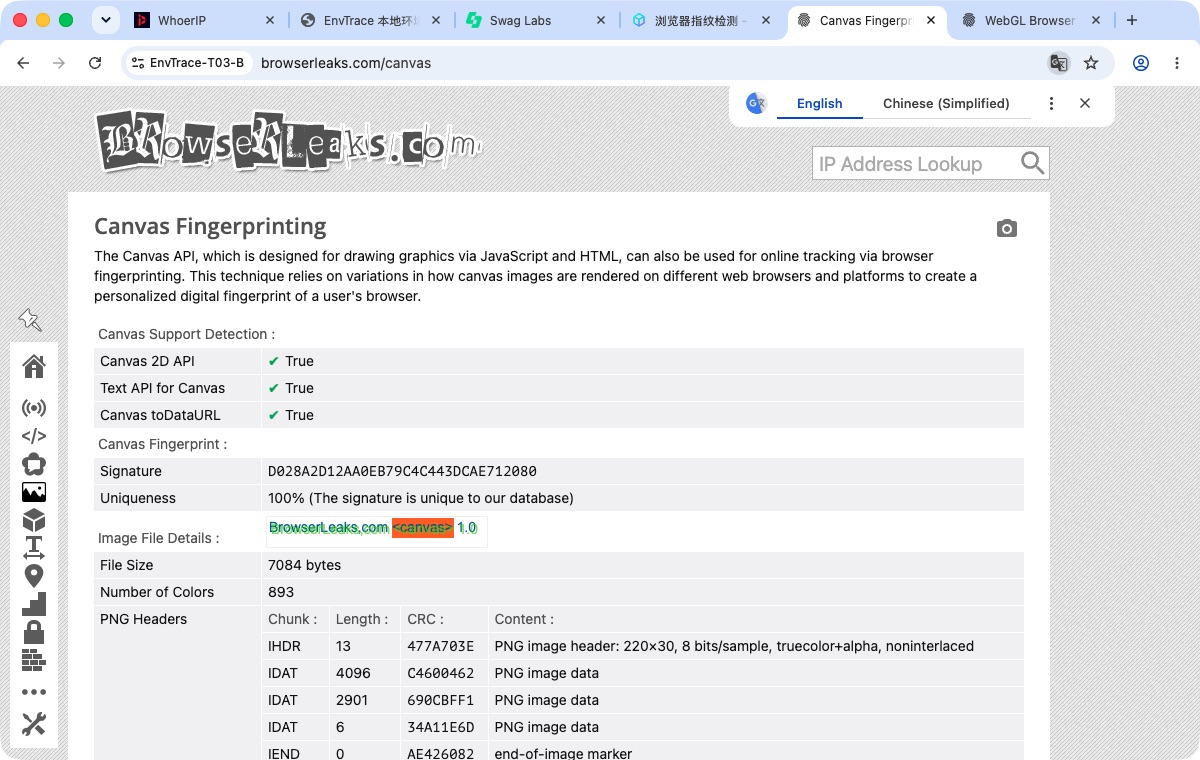
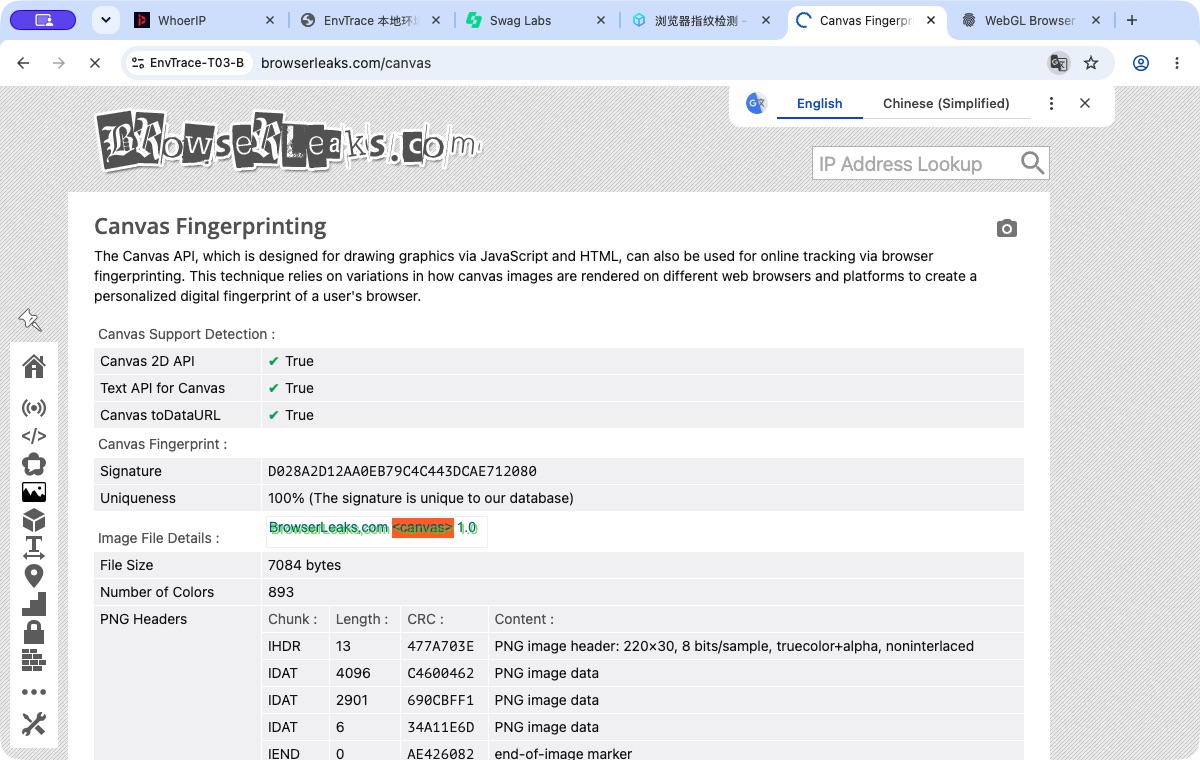
Our assessment: the control has an observable effect, and the profile preserves it. This is the behavior we want from a persistent fingerprint configuration: a deliberate change followed by a stable result.
Where the configuration experience needs work
The port allowlist required an extra submission action. The local experiment page worked in ordinary Chrome but initially failed in Mimic under its default port protection. Typing 8765 and saving did not retain the intended mode. Pressing Enter to create an allowlist entry made the setting take effect. Both profiles used the same temporary exception, which we removed after testing.
The final proxy selection needed checking. The creation screen showed different selections as it loaded. We explicitly selected the option for no separate profile proxy and checked the summary before creating the profiles. The Chinese term containing “global IP” also overlapped with terminology used by the computer’s network tool. Clear separation between computer connectivity and profile proxy settings would reduce confusion.
Fingerprint reports need field-level comparison. WhoerIP showed matching WebGL hashes for A and B, while BrowserLeaks showed different report and drawing hashes. The checks observe different aspects of the browser. Examining the actual field and method gives a more useful explanation than comparing headline scores.
A later login interruption supplied another lesson. SauceDemo’s login cookie has a ten-minute lifetime in the official source. After signing in again, A’s original cart remained; another full restart within the session lifetime also recovered the login. We recorded that event as website session expiry. Sauce Labs login source.
Ratings and product assessment
| Area | Rating | Reason |
|---|---|---|
| Profile data isolation | A | Independent state remained separated after writes and restarts |
| Same-computer fingerprint stability | A | Sampled readings repeated at the documented checkpoints |
| Fingerprint control | A− | A targeted Canvas change persisted; result visibility could improve |
| Configuration experience | B | Some controls needed additional interpretation or verification |
Multilogin’s strongest behavior here is selective adjustment followed by persistence. Real, Masked, and Noise modes serve different purposes, and the profile retains those choices as a reusable browser identity.
The product improvements we would prioritize are concrete: a final parameter preview before creation, labels showing whether a value comes from the device or the profile, a summary of fields affected by a change, and an explicit submission state for allowlist inputs. These would shorten the path from selecting a setting to trusting that it has taken effect.
More from the Multilogin review series
- Multilogin Review: Profile Isolation, Fingerprint Stability, and Everyday Use
- Using Multilogin in Restricted Regions: VPN, Agent, and Network Access
- Multilogin Web vs. Desktop: How to Choose Cloud or Local Profile Storage
- Multilogin Profile Isolation and Fingerprint Stability: Defaults, Canvas Noise, and Restarts
- Multilogin Data Recovery Test: Saved Logins, Browser State, and Deleted Profiles