On this page
- What a Multilogin profile gives you
- Test results and ratings
- Profile isolation: separate website state survives
- Fingerprints: useful defaults require interpretation
- Recovery: a usable workspace comes back
- Restricted regions: connection effort is part of the product experience
- Who gets the most value from it?
- More from the Multilogin review series
- Frequently asked questions
Multilogin performed well at the work a persistent browser profile needs to do: keep website data separate, preserve a repeatable browser identity, and restore usable sessions after a normal stop or an accidental deletion. Its main weakness in our testing was the setup experience. Network access, launcher ownership, and some configuration controls required more interpretation than they should.
We used a paid Pro 20 subscription on October 31, 2026. The core isolation and fingerprint tests ran on one Mac with Mimic 155.5. Both profiles used the computer’s existing network tunnel and the same Hong Kong exit. We kept that connection fixed to examine the profiles themselves. The test location was mainland China, which also supplied a practical case study for access from a restricted region.
Our verdict: Multilogin is a strong option for maintaining persistent browser profiles, provided you are willing to understand its configuration and connection workflow. The best part of the product is how separate website data, a saved browser identity, and recovery fit together in everyday use.
What a Multilogin profile gives you
A profile is a reusable browser workspace. It holds website sessions, cookies, bookmarks, browsing data, fingerprint settings, and any profile proxy configuration. For someone managing multiple accounts, the practical value is being able to reopen the right workspace with its previous state intact. Multilogin describes profiles as the basic unit of its account management workflow. Official profile explanation.
There are two separate choices to understand. The web interface and desktop app determine where you manage profiles. Cloud and local storage determine where profile data is saved. In the web workflow, an Agent is the background component that connects the dashboard to profiles running on your computer. The desktop app includes that launching capability. Official web and desktop workflow.
Our product assessment is that this design works best when you treat profiles as ongoing workspaces. A solo operator needs predictable launching and saving. A team also needs a clear handoff process and member permissions. Those needs explain why Multilogin offers more than one management interface and storage option.
Read the dedicated analysis: Multilogin web vs. desktop and cloud vs. local storage.
Test results and ratings
| Area | Rating | Evidence from our tests |
|---|---|---|
| Website data isolation | A | Two profiles kept separate storage, login state, and carts; saved data remained separate after restarts |
| Fingerprint stability on the same computer | A | Sampled device values, Canvas, audio, and WebGL repeated across refreshes and normal restarts |
| Control over fingerprint changes | A− | Changing only Canvas produced a new persistent output; the interface could explain the outcome more clearly |
| Configuration experience | B | Allowlist submission was easy to miss, proxy terminology needed interpretation, and some selections needed checking |
| Login recovery after a normal save | A | Login state, cart contents, bookmarks, and previous tabs returned on the same computer |
| Recovery from the trash bin | A | Profile information and saved website state returned after restoration |
An A means the tested workflow worked and the checked results could be reproduced. A− means the core function worked with friction in understanding or verifying it. B means the task was achievable but required extra configuration or troubleshooting. Network accessibility is assessed separately through the connection process and setup effort.
Profile isolation: separate website state survives
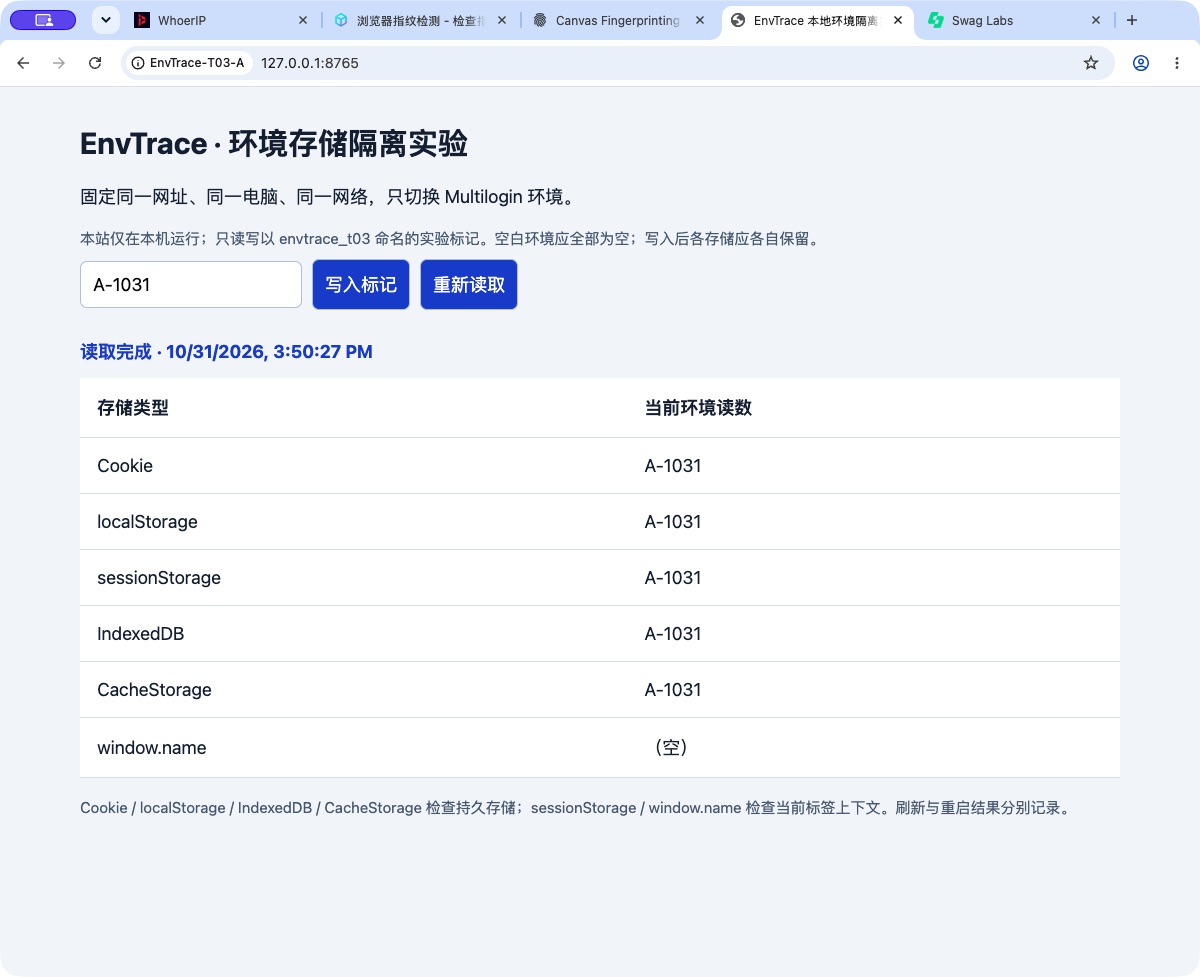
We wrote test markers in profile A, then opened the same local test page in profile B. On its first visit, B returned empty values for all six checks. After writing different markers in each profile, a full restart preserved five storage values under their respective profiles. The temporary window.name value cleared.
We also checked a real website workflow using SauceDemo’s public demonstration account. A was signed in while B still needed to log in. After both profiles signed in to that same demo account, their carts remained independent: A held a Backpack, and B held a Bike Light.
The useful outcome is continuity with separation. A profile can hold its own working state, and reopening it can take you back to that state without importing the other profile’s data.
Fingerprints: useful defaults require interpretation
Two profiles created with the same default options had different reported screen sizes, CPU core counts, operating system versions, and GPU names. BrowserLeaks also reported different WebGL drawing results. Their default Canvas and audio outputs, however, matched.
The configuration explains this combination. In our test, Canvas and audio used Real mode, while WebGL graphics used Noise mode. The defaults combined a generated device identity with selected outputs from the real machine. This is a configuration choice users should understand before treating every matching value as an isolation failure.
We then changed only B’s Canvas setting to Noise. EnvTrace and BrowserLeaks both returned a new Canvas value within their respective tests. That new value survived a refresh and a full stop and restart. Other sampled parameters stayed the same.
Our assessment: selective changes that persist are more useful than changing settings without a clear target. If distinct Canvas output matters to your workflow, select the relevant mode and check the resulting value. The product should make that relationship between a setting and its output easier to see.
Read the full comparison and repeat measurements: Multilogin profile isolation and fingerprint stability test.
Recovery: a usable workspace comes back
In the dedicated recovery test, we stopped a cloud profile and waited for the save confirmation. Reopening restored the website login, two cart items, a custom bookmark, and the previous tabs. Moving that profile to the trash bin and restoring it also preserved the original name, folder, notes, and saved website state.
The trash bin continued to consume a profile slot. We observed the plan count remain at 6/20 when the test profile moved there. Keeping a recovery option therefore also keeps that profile within the plan’s allocation.
Our recovery ratings are based on those operations. Account verification, storage encryption, and member permissions have a separate evidence record: interface checks and official documentation. This distinction makes the assessment useful when comparing products because each rating answers a specific operational question.
Read the steps and results: Multilogin login and deleted-profile recovery.
Restricted regions: connection effort is part of the product experience
Our mainland China setup became usable after changing the network routing and reconnecting the local component. We then completed the profile tests using that working setup. Reversing the proxy arrangement during the earlier connection checks caused the dashboard to become inaccessible again.
The broader lesson concerns connection coverage. The dashboard must reach Multilogin services, communicate with a local launcher, and open a profile that can reach its target sites. A VPN or proxy tool needs to support the relevant paths. Seeing Google load in an ordinary browser checks only that browser’s route.
Multilogin’s official restricted-region guidance proposes running the software on a suitable VPS outside the restricted location. Our own case used the local computer and its existing network tunnel. Official restricted-region guidance.
Our conclusion for restricted-network users: plan for additional setup and diagnosis. Clear connection status, useful errors, and a reliable reconnect flow affect how quickly users can begin working. They belong in a product review alongside fingerprint controls and profile recovery.
Read the adapted network analysis: Using Multilogin in restricted regions.
Who gets the most value from it?
| Your workflow | Our assessment |
|---|---|
| Maintaining a stable set of browser profiles | A good fit for the isolation, repeatability, and recovery demonstrated in this test |
| Inspecting and controlling fingerprint settings | Useful control, with a learning curve around defaults and reported results |
| A few profiles with minimal setup effort | Weigh the launcher and network setup against the value of persistent profiles |
| Team handoffs or multiple computers | Review the documented cloud storage and member-permission workflow closely |
| Access from a restricted network | Include connection preparation and initial troubleshooting in your rollout |
The strongest design decision is treating the profile as a durable workspace. Separate data, saved fingerprint choices, normal shutdown, and restoration form a coherent operating workflow. The clearest improvement opportunity is configuration feedback: show where values come from, what a change affects, and whether an input has actually been submitted.
We retained 27 screenshots and the detailed readings from the October 31 isolation and fingerprint session. The articles use the original Chinese-language UI captures with English explanations. The ratings follow the individual test results and operating conditions.
More from the Multilogin review series
- Multilogin Review: Profile Isolation, Fingerprint Stability, and Everyday Use
- Using Multilogin in Restricted Regions: VPN, Agent, and Network Access
- Multilogin Web vs. Desktop: How to Choose Cloud or Local Profile Storage
- Multilogin Profile Isolation and Fingerprint Stability: Defaults, Canvas Noise, and Restarts
- Multilogin Data Recovery Test: Saved Logins, Browser State, and Deleted Profiles