Datacenter IP vs residential IP explained
Proxy and VPN listings often label plans as residential, datacenter or native. That refers to how the IP block is registered, not connection speed. Platform risk systems check line type before raising verification on a login.
Also available in 简体中文
What residential and datacenter IPs are
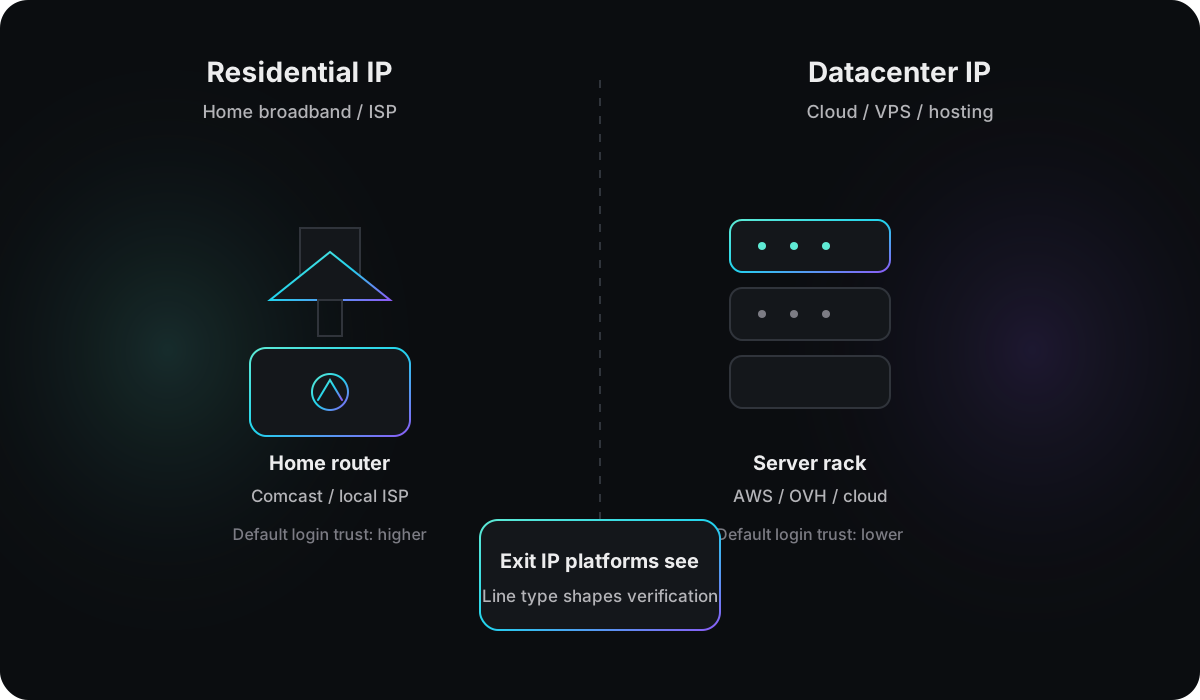
Every public IP belongs to a registered network block. WHOIS and routing databases record who owns it and how it is classified.
Residential IP is assigned by a home broadband provider or ISP to an end customer. ASN and organization fields usually name consumer ISPs such as Comcast or regional telecom operators.
Datacenter IP comes from cloud providers, VPS hosts or colocation facilities. Common owners include AWS, Google Cloud, DigitalOcean and OVH. These addresses map to server infrastructure, not a home router.
Some checks also label mobile IP: addresses from cellular carrier pools shared across many devices, with addresses that can change over time.
How platforms classify line type
Classification is mostly automated, based on three inputs:
- Registry data: WHOIS and RIR routing objects tagged as ISP, hosting or enterprise use.
- Commercial IP databases: feeds from IPinfo, MaxMind and fraud intelligence with residential, hosting, VPN and mobile labels.
- Historical behavior: ranges used for bulk signups, scanning or spam keep poor reputation even when registry data still says ISP.
The IP address check reads the exit IP you present to websites and returns line type, proxy / VPN / Tor flags, IP blacklist status and IP abuse risk. Before an important login, review all four fields, not line type alone.
Key differences
| Residential IP | Datacenter IP | |
|---|---|---|
| Typical source | Home broadband, ISP | Cloud, VPS, colocation |
| Registered owner | Consumer ISP | Hosting / cloud provider |
| Default trust for logins | Higher | Lower |
| Common use | Browsing, streaming, home office | Servers, automation, development |
| Proxy / VPN overlap | Residential proxy pools | Most cheap VPN and VPS exits |
| Shared with others | Sometimes (CGNAT, pools) | Almost always |
Two IPs in the same country and city can behave very differently at login. A Meta ad account signing in from an OVH hosting range often gets a different trust baseline than one from home broadband.
When residential IP fits
Residential IP reads like a real home broadband user. These use cases usually match that profile:
Ad and social dashboards
Meta Ads, Google Ads, TikTok creator or business accounts: logging in from a residential exit in the account target market usually means fewer verification prompts than a hosting range. Match country, timezone and language to the account profile instead of rotating IPs daily.
Marketplace sellers and payment accounts
Amazon, eBay, PayPal seller centers and wallets expect a stable regional home or ISP line. One store on one fixed residential exit fits a normal seller pattern better than a new datacenter IP every day.
Account flows that expect regional consistency
Signups, password recovery and phone binding often assume you are on a familiar network. Residential or mobile IP is closer to that profile. Use the account environment check to confirm IP, fingerprint and WebRTC point to the same region.
Streaming and geo-restricted content
For licensed regional content, residential IP belongs to a real ISP and is less often blocked at the range level than datacenter. Content systems differ from account risk, but line type is still read.
When residential IP is a poor fit
24/7 servers, high-volume APIs, bulk crawling and email blasts. Residential bandwidth and stability lag datacenter, and abuse drags down shared pool reputation.
When datacenter IP fits
Datacenter IP offers cost, bandwidth, control and predictability. These are reasonable choices:
Site and app hosting
Websites, APIs and backend services on AWS, GCP or VPS naturally exit as datacenter. Platforms do not flag that as abnormal.
Development and testing
CI/CD, staging, integration tests and load tests. Fixed datacenter IP with ample bandwidth simplifies logs and monitoring.
Permitted data collection
Scheduled collection from public pages that allow it. A dedicated VPS exit makes rate limits, rotation and isolation easier. Follow robots.txt and terms of service.
Privacy browsing and general VPN use
Hiding browsing from a local ISP, without high-value account logins, can work on a datacenter VPN. Banks, ad dashboards and seller portals raise scrutiny.
Mail and automation infrastructure
Self-hosted mail, webhooks and bot notifications usually run on datacenter hosts. That is separate from logging into Gmail on a personal account.
When datacenter IP is a poor fit
Daily ad account work, new social signups, cross-border store logins, crypto deposits and withdrawals, and any high-value flow where the platform prefers home network traffic.
Residential IP pitfalls
Dirty history in shared pools
Most residential proxies are shared. Bulk signups, spam or attacks on the same address leave blacklist hits and abuse scores. Run an IP address check before you buy, not after a lockout.
Mislabeled plans: sold as residential, reads as datacenter
Common on cheap tiers. The check shows datacenter or hosting while the listing says residential. Test the line before committing to a long billing cycle.
IP drift breaks consistency
Dynamic residential IP can change every few hours or days. An account tied to one US state may see another on the next login, triggering verification. For stable exits, use static residential or confirm sticky session length with the provider.
Mismatch with browser environment
Residential IP in the US with Asia timezone, Chinese UI language and WebRTC leaking a domestic ISP reads worse than datacenter alone. Line type is one signal among several.
Native does not mean dedicated
Native usually means the exit country matches ISP registration. The address can still sit in a shared pool. Dedicated residential costs more but reduces cross-account fallout when you isolate accounts.
Datacenter IP pitfalls
High-value logins almost always get extra review
Signing into Meta Ads, Amazon Seller Central or a new TikTok account from AWS, DigitalOcean or OVH ranges triggers verification, limits or freezes more often than home broadband. Login is not impossible, but expect stricter review.
Abused ranges with burned reputation
Cheap VPS and public VPN exits attract scripts and signup farms. The whole /24 inherits poor trust even for legitimate use. Switching region or provider can be faster than appeals.
Many accounts linked on the same block
Adjacent cloud IPs often serve the same user cohort. A neighbor on 1.2.3.5 banned for abuse can widen review on 1.2.3.4. Use dedicated exits for critical accounts and avoid popular cheap blocks.
Changing IP alone is not enough
Clean browser fingerprint on datacenter IP still does not read as home user. Platforms also score Canvas, WebGL, fonts and WebRTC. IP rotation without environment alignment leaves the gap.
WebRTC leak negates the proxy
Proxy shows datacenter or residential exit while WebRTC exposes your real home IP. You present two lines at once. Run a WebRTC leak test in the same session before login.
IPv6 datacenter ranges stand out too
Some platforms treat IPv6 hosting addresses as strictly as IPv4. If you only test IPv4, IPv6 leakage can bypass your setup.
Impact on account logins
Platforms rarely block on datacenter line type alone. More common triggers are mismatched signals, such as:
- A US exit IP with an Asia browser timezone
- A residential proxy label with a different home IP exposed through WebRTC
Hosting ranges draw extra scrutiny because they are cheap, easy to rotate and heavily used for automation. Ad platforms (Meta, Google Ads), marketplaces (Amazon, eBay), social apps (TikTok) and payment services tend to be stricter on logins and money movement from datacenter IPs.
Residential and mobile lines start closer to a typical user connection, but shared pools can inherit prior abuse on the same address. For signals beyond line type, see How to Check If Your IP Is Clean.
How to check your current line type
- Connect through the proxy, VPN or network you plan to use for login.
- Open the IP address check.
- Read the line type field: residential, datacenter or mobile.
- Review proxy / VPN / Tor flags, IP blacklist status and IP abuse risk.
Connect first, then run the check. If you open the page on home Wi‑Fi without the proxy connected, the result reflects your local broadband, not the proxy exit.
If the result shows datacenter while the provider sold a residential plan, save the result, request a replacement line, then retry before logging into high-value accounts. On a proxy connection, run a WebRTC leak test in the same session to confirm no second address leaks alongside the exit IP.
Before login, confirm IP type, timezone, language, browser fingerprint and WebRTC align with the exit region. Picking the wrong line type for the use case often fails before IP reputation does.